

Instagram Reels are a popular way to share celebrity interviews, movie teasers, behind-the-scenes footage, and entertainment highlights. However, finding a Reel again can be difficult, especially when posts disappear or become unavailable.
To download an Instagram Reel, copy its link, paste it into a browser-based downloader such as Grabfy, and save the available video file to your device. This approach can be useful for offline reference without installing another application.
Instagram also offers built-in downloading for eligible public Reels. This guide explains both methods, how to save videos on different devices, and what to consider when preserving quality and respecting copyright.
How to Download Instagram Reels Quickly
The simplest method depends on whether Instagram provides a download button for the Reel.
When a creator allows downloads, you can save the video directly through Instagram. Otherwise, a browser-based downloader may help with supported public content.
The basic process involves finding a public Reel, copying its URL, opening a compatible downloader, pasting the link, and saving the available video.
Many online tools provide MP4 files compatible with modern devices. However, the downloaded quality depends on the version Instagram makes accessible.
Method 1: Use Instagram’s Built-In Save and Download Features
Instagram provides two ways to keep Reels: saving them within the application and downloading eligible videos to your device.
Save Reels Within Instagram
Instagram’s Save feature works like a bookmark rather than a file download.
Open the Reel, select Save, and find it later through your profile’s Saved section. You can also organize saved posts into collections.
This works well when you want to revisit celebrity interviews or movie announcements without storing additional files.
However, bookmarked Reels remain on Instagram and may become unavailable if the creator deletes them or changes their visibility.
Download Reels Directly from Instagram
For eligible public Reels, open the video, tap Share, and select Download if available.
Instagram may save the file directly to your phone’s photo library or, on iPhone, to your camera roll. Downloaded Reels may include a watermark, and licensed music can be omitted or some audio tracks muted due to copyright restrictions.
Not every Reel offers this option. Creators can control download availability, and certain content may be restricted.
Method 2: Download Instagram Reels Online With Grabfy
Browser-based downloading is convenient when you want an accessible video file with no app installation required.
For users collecting authorized entertainment references, Grabfy is a dedicated tool and browser-based platform to save Instagram Reels from supported public links in HD MP4 format, with no account creation needed. It provides a straightforward way to save supported public Reels using their links.

This is particularly useful for celebrity interviews, movie teaser clips, promotional footage, and educational videos that you want to revisit offline.
How to Use Grabfy’s Reels Downloader
Open Instagram and locate the public Reel. Tap Share and select Copy Link. Open Grabfy’s dedicated Reels downloading tool. Paste the copied URL into the input field. Select Download and wait for the available file. Save the video to your device.The same general workflow works on mobile phones and desktop computers.
Can You Download Instagram Reels Without a Watermark?
Some third-party downloaders provide files without adding their own branding. However, watermark-free output cannot be guaranteed for every Reel.
If the available source video already contains a watermark, downloading it through another website may not remove it.
Audio availability also depends on the source file and licensing restrictions.
Method 3: Download Instagram Reels on Different Devices
The download process is similar across devices. The main differences involve browsers, file locations, and media libraries.
How to Download Instagram Reels on iPhone
Open Instagram, copy the Reel link, and launch Safari or Chrome.
Paste the URL into a compatible downloader and save the available file. Check the Files app, particularly Downloads, if the video does not appear in Photos.
You can open a compatible downloaded video and select Save Video to move it into your photo library.
How to Download Instagram Reels on Android
Copy the Reel URL, open Chrome or another browser on your android phone, and paste the link into the downloader.
After downloading, check your file manager’s Downloads folder. MP4 videos may also appear in Google Photos or your gallery.
How to Download Instagram Reels on Windows or Mac
Open Instagram in your browser and copy the Reel’s URL.
Paste it into a compatible downloading tool, start the download, and choose where to save the MP4 file.
Desktop downloads are useful when organizing authorized video references for editing or entertainment projects.
How to Download Instagram Reels in Original Quality
Instagram processes and compresses uploaded videos, so the version available for downloading may differ from the creator’s original recording.
A downloader cannot reconstruct details removed during compression or guarantee access to the original uploaded file.
For better results, choose the highest available quality, avoid repeated conversions, and keep an untouched copy before editing.
Creators who need original quality should preserve their exported master files before uploading videos to Instagram.
How to Choose a Safe Instagram Reels Downloader
Not every downloading website provides the same experience.
Avoid services requesting Instagram passwords, suspicious browser extensions, or unnecessary device permissions.
Check that download controls are clearly labeled and that the website uses HTTPS. Remember that HTTPS alone does not guarantee trustworthiness.
Be skeptical of tools promising unrestricted access to private Reels. Legitimate public-content downloaders cannot override Instagram’s account privacy settings.
What Other Instagram Content Can You Save?
Reels are only one part of Instagram’s content ecosystem. Depending on availability, users may also save supported public videos, photos, carousels, and Stories.
Instagram Videos and Movie Teasers
Public video posts may include longer interviews, promotional announcements, and behind-the-scenes footage.
For users who want access to multiple Instagram media formats, Grabfy’s Instagram downloader provides a convenient browser-based starting point for saving supported public content.
Its dedicated tools make it practical to organize different types of authorized visual references without relying on separate applications for every format.
Instagram Photos and Carousels
Carousel posts combine multiple photographs, videos, or images within one publication.
Compatible downloaders may help preserve supported carousel pictures when relevant, particularly when archiving your own promotional campaigns or approved creative materials.
Instagram Stories and Highlights
Instagram Stories normally disappear after 24 hours unless preserved as Highlights.
Browser-based Story downloaders may retrieve supported public media while it remains accessible. Private Stories and Close Friends content are not publicly downloadable.
Common Problems When Downloading Instagram Reels
The Reel Link Doesn’t Work
Check that you copied the complete URL. Deleted, restricted, or unavailable posts may prevent retrieval.
The Downloaded Video Has No Sound
Missing audio can result from licensing restrictions or source-file limitations. Check the original Reel and try another compatible media player.
The Video Doesn’t Appear in Your Gallery
On iPhone, check Files. On Android, check Downloads. On desktop, review your browser’s download history.
Tips for Organizing Downloaded Instagram Reels
Create separate folders for celebrity interviews, movie teasers, editing references, and your own published videos.
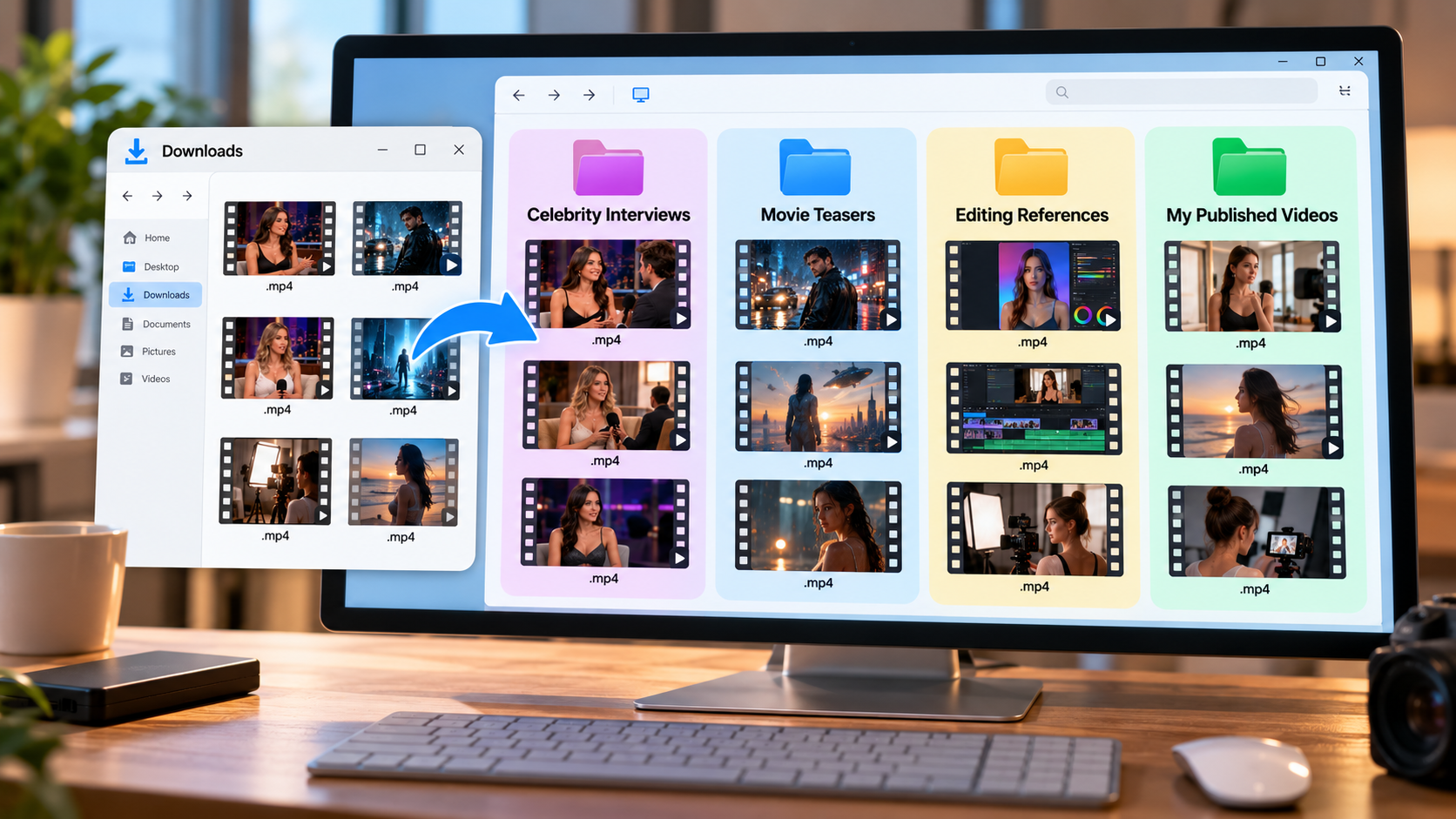
Use descriptive filenames containing the topic and date. Keep backups of original content you own or are authorized to archive.
For professional projects, record the source and any permissions associated with downloaded media.
Is It Legal to Download Instagram Reels?
Downloading a Reel and having permission to reuse it are different matters.
Copyright generally belongs to the creator or other rights holder. Public availability does not automatically authorize redistribution or commercial use.
Saving your own content is generally more straightforward. For someone else’s video, obtain appropriate permission before reposting, modifying, or using it commercially.
Be especially careful with copyrighted music, movie footage, and branded promotional materials.
Final Thoughts
Downloading Instagram Reels can be useful for preserving celebrity interviews, movie teasers, tutorials, and creative references.
Final Words
Instagram’s built-in download feature works for eligible videos, while Grabfy offers a convenient browser-based approach if you want the right tool to save Instagram content on your preferred device.
Whichever method you choose, check video quality, organize saved files carefully, and respect the creator’s rights.



 Bengali (Bangladesh) ·
  English (United States) ·